

Printer Price in Bangladesh
Looking for the latest Printer Price in Bangladesh? IT SPACE offers a wide range of printers for home, office, business, education, professional work, and commercial use. Whether you need a simple printer for occasional document printing or a multifunction printer for regular office workloads, you can choose from different printing technologies, features, sizes, and price ranges.
A printer is an important part of many home and office setups. Depending on your requirements, you can choose an Inkjet Printer, Laser Printer, Ink Tank Printer, Multifunction Printer, All-in-One Printer, or Single Function Printer. Selecting the right printer can help reduce running costs and provide better printing efficiency over the long term.
Find the Right Printer for Your Needs
Inkjet Printer
An Inkjet Printer is a popular choice for home users, students, small offices, and users who need good-quality color printing. Inkjet printers can be suitable for documents, graphics, photos, assignments, and everyday printing.
If you regularly print in color, consider the printer's ink cost, print resolution, speed, connectivity, and supported paper types before purchasing.
Ink Tank Printer
An Ink Tank Printer is designed for users who print frequently and want a practical solution for managing printing costs. These printers use refillable ink tanks instead of traditional cartridges.
Ink tank printers can be particularly useful for homes, schools, offices, businesses, and users with higher-volume color printing requirements. Before buying, compare the ink bottle cost, page yield, print speed, connectivity, and maintenance requirements.
Laser Printer
A Laser Printer is commonly preferred for fast and efficient document printing. Laser printers can be an excellent choice for offices and businesses that primarily print text documents.
Depending on the model, you can choose between monochrome and color laser printers. When comparing laser printers, consider print speed, toner cost, monthly duty cycle, connectivity, paper capacity, and overall running cost.
Multifunction Printer
A Multifunction Printer (MFP) combines multiple functions in a single device. Depending on the model, an all-in-one printer may offer printing, scanning, copying, and sometimes faxing.
Multifunction printers can save desk space and reduce the need for separate office equipment. They are suitable for businesses, offices, educational institutions, and home users who need more than basic printing.
Single Function Printer
A Single Function Printer is designed primarily for printing. It can be a practical choice when scanning and copying are not required.
For users who only need regular document or photo printing, a single-function printer can offer a straightforward setup without paying for features they do not need.
Printer for Home & Students
A home printer can be useful for printing assignments, forms, documents, educational materials, photos, and other personal requirements. Students may benefit from an affordable printer with low running costs and convenient connectivity.
For occasional printing, a compact printer may be sufficient. If you print frequently, an ink tank printer can be worth considering because of its refillable ink system.
Printer for Office & Business
For offices and businesses, printer selection should focus on printing speed, monthly volume, running cost, paper capacity, connectivity, reliability, and ease of maintenance.
A monochrome laser printer can be suitable for offices that primarily print text documents, while a color multifunction printer may be more appropriate for businesses that need color documents along with scanning and copying.
WiFi & Network Printer
Modern printers may offer WiFi, Ethernet, USB, or other connectivity options, allowing users to print from computers, laptops, smartphones, and other compatible devices.
A WiFi printer can be especially convenient in homes and offices because multiple users can access the printer without connecting a USB cable every time.
Before purchasing, check compatibility with your operating system, mobile devices, network environment, and preferred printing method.
Printer Brands
IT SPACE offers printers from leading brands depending on current availability. Popular printer brands include HP, Canon, Epson, Brother, Pantum, and other manufacturers.
Each brand offers different printer series designed for specific users. Some models focus on affordable home printing, while others are designed for high-volume office printing, professional color output, or multifunction business use.
How to Choose the Best Printer
Consider Your Printing Volume
First determine how frequently you print. Occasional users may prefer a simple printer, while high-volume users should consider models designed for regular workloads and economical running costs.
Choose the Right Printing Technology
Inkjet and ink tank printers can be suitable for color printing, photos, and mixed documents. Laser printers are often preferred for fast text-document printing and office workloads.
Check Running Cost
Don't consider only the initial printer price. Ink, toner, maintenance, paper consumption, and replacement parts can contribute significantly to the total cost of ownership.
Check Connectivity
Consider whether you need USB, WiFi, Ethernet, mobile printing, or other connectivity options. A network-enabled printer can be useful when several users need access.
Consider Multifunction Features
If you need scanning and copying in addition to printing, an All-in-One Printer can be more practical than purchasing separate devices.
Printer Price in Bangladesh
The Printer Price in Bangladesh varies depending on printing technology, brand, print speed, resolution, connectivity, cartridge or ink system, multifunction features, and intended workload.
Affordable printers can be suitable for home and student use, while higher-end business printers are designed for greater printing volumes and more advanced features.
When comparing printers, consider both the purchase price and the long-term printing cost per page. A slightly more expensive printer may provide better value if its ink or toner costs are lower and it meets your printing requirements more efficiently.
Buy Printer from IT SPACE
IT SPACE offers a wide selection of Printers in Bangladesh for home, office, education, business, and professional requirements. You can explore inkjet printers, ink tank printers, laser printers, multifunction printers, WiFi printers, and other printing solutions.
Since 2007, IT SPACE has been providing computers, laptops, desktop PCs, monitors, printers, networking products, CCTV solutions, UPS systems, gaming accessories, and other IT products.
Whether you need a printer for assignments, home documents, office work, business printing, or high-volume workloads, explore the Printer category at IT SPACE and choose a model according to your printing requirements and budget.
Frequently Asked Questions
What is the Printer Price in Bangladesh?
Printer prices vary depending on brand, printing technology, print speed, connectivity, features, and whether the printer includes scanning and copying functions.
Which printer is best for home use?
An inkjet or ink tank printer can be suitable for home users. The right choice depends on printing frequency, color requirements, running cost, and budget.
Which printer is best for office use?
Laser printers and multifunction printers can be practical for offices, particularly when fast document printing, regular workloads, scanning, and copying are required.
Is an Ink Tank Printer better than a cartridge printer?
For users who print frequently, an ink tank printer can offer convenient refillable ink and potentially lower running costs. The best choice depends on printing volume and requirements.
Which is better, Inkjet or Laser Printer?
Inkjet printers can be suitable for color printing and photos, while laser printers are often preferred for fast and efficient text-document printing. Your workload should determine the better option.
What is a Multifunction Printer?
A multifunction printer combines printing with other functions such as scanning and copying. Some models may also include fax functionality.
Is a WiFi printer useful?
Yes. A WiFi printer can allow multiple compatible devices to print over a wireless network, making it convenient for homes and offices.
How can I reduce printer running costs?
Choose a printer based on your expected printing volume and compare ink or toner prices, page yield, maintenance requirements, and estimated cost per page before purchasing.
What should I check before buying a printer?
Check printing technology, print speed, resolution, connectivity, paper capacity, ink or toner system, monthly duty cycle, operating system compatibility, and running cost.
Where can I buy a Printer in Bangladesh?
You can explore different Printers at IT SPACE, including inkjet, ink tank, laser, multifunction, WiFi, and other printer solutions for home, office, business, and educational use.

- 300m maximum ribbon length
- Resolution: 203 DPI (8 dots/mm)
- Maximum Print Speed: 6 inches/second
- Max. Print Width: 4 inches
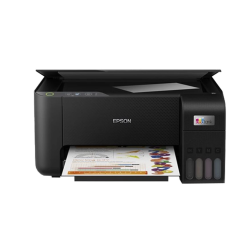
- High-Yield EcoTank Ink System
- 5760 × 1440 dpi Printing
- Print Scan Copy Function
- 4500 Black 7500 Color Pages
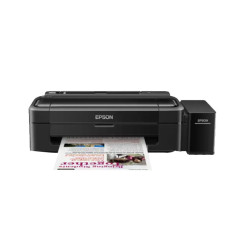
- Print Speed (Black) 27 ppm
- Print Resolution (Black) 5760 Dpi
- Paper Sizes A4, A5, A6, B5, C6, DL
- Input Capacity: 50 Sheets A4 Plain paper (75 g/m2)

- Function: Print only
- Print Speed: up to 21 ppm (black)
- Print Resolution: Up to 1,200 x 1,200 dpi
- Connectivity: Hi-Speed USB 2.0, Wi-Fi
- Laser 1008a
- Print Speed: Up to 20 ppm (black)
- Up to 10000 Pages pages
- Connectivity: USB