

Desktop PC Price in Bangladesh
Looking for the best Desktop PC Price in Bangladesh? IT SPACE brings you a wide range of desktop computers for home, office, business, education, professional work, content creation, and gaming. From affordable everyday desktop PCs to powerful gaming computers and customized PC builds, you can find different configurations to match your requirements and budget.
A desktop computer is still a popular choice for users who want dependable performance, larger display options, easy maintenance, and better upgrade flexibility. Unlike many compact computing devices, a desktop PC allows you to select and upgrade components such as the processor, RAM, SSD, graphics card, motherboard, power supply, and PC case according to your needs.
Desktop PC in Bangladesh
At IT SPACE, our Desktop PC collection is designed for different types of users. You can choose a Brand PC, Custom Built PC, Gaming PC, Office Desktop, Business PC, Mini PC, or a performance-oriented desktop depending on your workload.
Before purchasing a desktop computer, consider the processor generation, RAM capacity, storage type, graphics requirements, motherboard compatibility, power supply, and future upgrade options. A properly balanced configuration can provide better performance and value than choosing individual components based only on price.
Brand Desktop PC
A Brand Desktop PC is a complete computer system manufactured and configured by a recognized brand. Brand PCs can be a convenient option for offices, businesses, educational institutions, and home users who prefer a ready-to-use computer with a standardized configuration.
Popular brand desktop computers may come from manufacturers such as HP, Dell, Lenovo, ASUS, Acer, and other leading brands, depending on availability. These systems are generally suitable for users who want a complete desktop solution without selecting and assembling every individual component.
When choosing a brand PC, pay attention to the processor, RAM, SSD capacity, graphics solution, connectivity, operating system, warranty, and available upgrade options.
Custom Built Desktop PC
A Custom PC allows you to select individual components according to your specific requirements. This is a popular option for users who want greater control over performance, budget, and future upgrades.
For example, an office computer may prioritize a reliable processor, adequate RAM, and fast SSD storage, while a gaming or professional workstation may require a dedicated graphics card, higher RAM capacity, powerful processor, and better cooling.
A properly configured custom desktop can also provide an excellent upgrade path. You may later add more RAM, increase storage capacity, upgrade the graphics card, or replace other components when your requirements change.
Gaming Desktop PC
A Gaming PC is designed for users who want higher graphics performance and responsive gameplay. Gaming desktop configurations typically combine a capable processor with a dedicated graphics card, sufficient RAM, fast SSD storage, a suitable power supply, and an effective cooling solution.
The ideal gaming PC depends on the games you play and your preferred resolution and frame rate. Entry-level gaming PCs can handle many popular games, while higher-end configurations are better suited for demanding AAA titles, competitive gaming, streaming, video editing, and other graphics-intensive workloads.
If you are building a complete gaming setup, IT SPACE also offers gaming monitors, gaming keyboards, gaming mice, gaming headsets, PC cases, graphics cards, power supplies, and other gaming accessories.
Office & Business Desktop PC
For offices and businesses, a reliable Office Desktop PC can support everyday productivity tasks such as Microsoft Office, accounting software, internet browsing, email, documentation, inventory management, printing, and business applications.
Business users generally need a system that offers dependable performance, easy maintenance, appropriate connectivity, and good long-term usability. Depending on the workload, an entry-level Core i3 desktop may be sufficient for basic tasks, while a Core i5 Desktop PC or higher configuration can be more suitable for multitasking and demanding business applications.
Desktop PC for Students & Home Users
A desktop computer can be an excellent choice for students and home users who need a reliable workstation for online classes, research, assignments, programming, browsing, presentations, entertainment, and everyday computing.
An affordable desktop with a modern processor, sufficient RAM, and SSD storage can provide fast startup and smooth performance for common applications. If portability is not important, a desktop setup can also offer better flexibility with monitor size, storage, peripherals, and future upgrades.
Mini PC
A Mini PC is designed for users who want a compact computer that takes up less desk space. Mini PCs can be suitable for office work, digital signage, home entertainment, browsing, education, and other everyday tasks depending on their specifications.
Their compact design makes them useful for small workspaces where a traditional tower PC may not be necessary. Before buying a Mini PC, check its processor, RAM, SSD capacity, connectivity, display support, and upgrade options.
Workstation Desktop PC
Professional users working with graphic design, video editing, CAD, 3D applications, architecture, engineering, programming, data processing, and other demanding workloads may require a workstation-class desktop.
A professional workstation should be selected based on the requirements of the software you use. Depending on the workload, this may include a high-performance processor, larger RAM capacity, fast NVMe SSD storage, dedicated graphics, and a reliable power supply.
How to Choose the Right Desktop PC
Choosing the right desktop becomes easier when you first identify your primary use.
For basic computing: Choose a modern processor, sufficient RAM, and an SSD for browsing, Office applications, online learning, and general tasks.
For office and business: Prioritize reliability, multitasking performance, storage, connectivity, and long-term serviceability.
For gaming: Pay particular attention to the graphics card, processor, RAM, SSD, cooling, and power supply.
For graphics and video editing: Choose a powerful CPU, adequate RAM, fast SSD storage, and a suitable dedicated GPU.
For future upgrades: Select a motherboard, power supply, and case that provide room for additional RAM, storage, graphics, or other components.
Desktop PC Price in Bangladesh
The Desktop PC Price in Bangladesh depends on the configuration, brand, processor, RAM, SSD, graphics card, motherboard, power supply, case, and other components. Entry-level desktop computers can be suitable for everyday tasks, while high-performance gaming PCs and professional workstations can cost considerably more because of their advanced components.
Instead of choosing a desktop based only on the lowest price, compare the complete specification and consider how well the system matches your intended workload. A balanced configuration can provide better performance, reliability, and upgrade potential over time.
Why Buy Desktop PC from IT SPACE?
IT SPACE has been serving customers with computers and IT products since 2007. Our product range includes desktop PCs, laptops, monitors, printers, networking equipment, CCTV solutions, UPS systems, gaming accessories, and computer components.
Whether you are a student looking for an affordable computer, a business owner setting up office systems, a professional who needs a workstation, or a gamer building a powerful PC, IT SPACE provides desktop solutions for different requirements and budgets.
Explore the Desktop PC collection at IT SPACE to compare available configurations and find a computer that fits your work, study, business, entertainment, or gaming needs.
Frequently Asked Questions
1. What is the Desktop PC Price in Bangladesh?
Desktop PC prices vary depending on the processor, RAM, SSD, graphics card, motherboard, brand, and other components. Entry-level systems cost less, while gaming PCs and professional workstations require a higher budget.
2. Which Desktop PC is best for office work?
For normal office applications, accounting, browsing, documentation, and business software, a desktop with a modern Core i3 or Core i5 processor, sufficient RAM, and SSD storage is generally a practical choice.
3. Is a custom PC better than a Brand PC?
A custom PC provides greater flexibility because you can select individual components according to your requirements. A Brand PC can be more convenient for users who prefer a ready-made system from a recognized manufacturer.
4. Which Desktop PC is suitable for gaming?
A gaming PC should have a capable processor, dedicated graphics card, adequate RAM, fast SSD storage, suitable cooling, and a reliable power supply. The required configuration depends on the games and desired performance.
5. How much RAM should a Desktop PC have?
The required RAM depends on your workload. Basic users need less memory than gamers, content creators, designers, programmers, or professionals running demanding applications.
6. Should I choose SSD or HDD for a Desktop PC?
An SSD is recommended for the operating system and applications because it provides faster boot and loading times. An HDD can still be useful when you need additional storage capacity at a lower cost.
7. Can I upgrade my Desktop PC later?
Yes. Depending on the motherboard and case, many desktop PCs allow upgrades to RAM, SSD/HDD storage, graphics cards, processors, and other components.
8. Which processor is best for a Desktop PC?
There is no single best processor for every user. The right CPU depends on your workload and budget. Office users may need a mid-range processor, while gaming and professional workloads may require higher-performance CPUs.
9. Is a Desktop PC better than a laptop?
A desktop can provide better upgradeability, cooling, and performance flexibility, while a laptop is more suitable for users who need portability. The better choice depends on how and where you use your computer.
10. Where can I buy a Desktop PC in Bangladesh?
You can explore desktop computers, custom PC configurations, gaming PCs, and computer components at IT SPACE, with options for home, office, business, education, professional work, and gaming.

- Processor: AMD Ryzen 5 9500F (6MB Cache, up to 5GHz)
- Memory: 16GB (1x 16GB) DDR5 U-DIMM
- Storage: 1TB Gen4 SSD
- Graphics: GeForce RTX 5060 WINDFORCE MAX OC 8G

- Processor: AMD Ryzen 5 9500F (6MB Cache, up to 5GHz)
- Memory: 32GB (2x 16GB) DDR5 U-DIMM
- Storage: 1TB Gen4 SSD
- Graphics: GeForce RTX 5060 Ti WINDFORCE MAX OC 16G
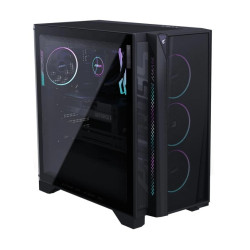
- Processor: AMD Ryzen 7 9700X (8MB Cache, up to 5.5GHz)
- Memory: 32GB (2x 16GB) DDR5 U-DIMM
- Storage: 2TB Gen4 SSD
- Graphics: GeForce RTX 5070 Ti WINDFORCE OC SFF 16G

- Processor: Intel Core i3-14100 (12M Cache, up to 4.7GHz)
- RAM: 8GB DDR5-5600MHz, Storage: 512GB M.2 2280 PCIe NVMe SSD
- Graphics: Integrated, Intel UHD Graphics 730
- Lenovo Original USB Keyboard & Mouse

- Processor: Intel Core i3-1315U (10MB Cache, up to 4.5 GHz)
- RAM: 8GB DDR5 SO-DIMM 5600MT/s
- Storage: 512GB M.2 2280 NVMe PCIe 4.0 SSD
- ASUS USB Keyboard & Mouse, Power Supply: 330W 80+ Platinum

- Processor: Intel Core i7 14700 (33MB Cache, up to 5.4 GHz)
- RAM: 16GB DDR5 4800 MHz, Storage: 512GB M.2 PCIe NVMe, SSD
- Graphics: Intel UHD Graphics 730 with Shared Graphics Memory
- Dell Wired Keyboard & Dell Optical Mouse
- Processor: Intel Core i5 14400 (20MB Cache, up to 4.7 GHz)
- RAM: 8GB DDR5 4800 MHz, Storage: 512GB M.2 PCIe NVMe, SSD
- Graphics: Intel UHD Graphics 730 with Shared Graphics Memory
- Dell Wired Keyboard & Dell Optical Mouse

- Processor: Intel 14th Gen Core i5-14400 (up to 4.70 GHz)
- RAM: 8GB, Storage: 512GB SSD M.2 NVMe
- Acer USB Keyboard & Mouse
- Built-in internal Speaker, Wi-Fi 6E , BT

- Processor: Intel Core i3-14100 (12M Cache, up to 4.70 GHz)
- Memory: 8GB DDR5, Storage: 512GB NVMe PCIe SSD
- Graphics: Integrated, Intel UHD Graphics 770
- HP USB Keyboard & Mouse
- Processor: Intel Core i5-14500 (24 MB cache, Up to 5.00 GHz turbo)
- Memory: 8GB DDR5, Storage: 512GB NVMe PCIe SSD
- Graphics: Integrated, Intel UHD Graphics 770
- HP USB Keyboard & Mouse