

PC Components Price in Bangladesh
Looking for the latest PC Components Price in Bangladesh? IT SPACE offers a wide range of computer components for building a new desktop PC, upgrading an existing computer, or replacing individual hardware. From processors and motherboards to RAM, SSD, graphics cards, power supplies, and PC cases, you can find essential computer parts for different types of users and budgets.
Choosing the right components is important because every part of a computer works together. A properly balanced configuration can provide better performance, stability, and upgrade flexibility for years to come.
Explore Computer Components
Processor (CPU)
The processor is one of the most important components of a PC. It handles instructions and performs the calculations required by applications and the operating system. IT SPACE offers processors suitable for office computers, home PCs, gaming systems, professional workstations, and other computing requirements.
When selecting a CPU, consider the processor generation, number of cores and threads, clock speed, supported motherboard socket, and your intended workload.
Motherboard
The motherboard connects the processor, RAM, storage, graphics card, and other hardware. It also determines many of the connectivity and upgrade options available on your PC.
Before buying a motherboard, check CPU compatibility, chipset, RAM support, M.2 slots, PCIe slots, USB ports, networking features, and other required connectivity.
RAM
RAM (Random Access Memory) allows your computer to work with applications and data efficiently. Having sufficient RAM is important for multitasking, gaming, professional applications, and everyday computing.
The required RAM depends on how you use your PC. Always check the motherboard's supported RAM generation, capacity, and speed before purchasing memory.
SSD & HDD
Storage is essential for installing the operating system, applications, games, and storing personal files.
An SSD offers faster boot times, application loading, and overall system responsiveness. NVMe SSDs can provide even faster performance on compatible motherboards. HDDs remain useful for users who need large storage capacity at a comparatively lower cost.
Graphics Card
A dedicated Graphics Card (GPU) is important for gaming, video editing, 3D rendering, graphic design, animation, and other graphics-intensive workloads.
When selecting a graphics card, consider the performance requirements of your applications or games, monitor resolution, available power supply capacity, physical dimensions, and budget.
Power Supply
The Power Supply Unit (PSU) supplies power to all components of the computer. A reliable power supply is essential for stable operation.
When choosing a PSU, consider the total power requirement of your PC, efficiency, connectors, quality, and possible future upgrades.
PC Case
A PC Case houses and protects the internal components. It also plays an important role in airflow, cooling, cable management, and future expansion.
Make sure the case supports your motherboard size, graphics card dimensions, CPU cooler, storage devices, and cooling fans.
PC Components for Gaming
Building a Gaming PC requires careful component selection. The graphics card has a major impact on gaming performance, while the processor, RAM, SSD, power supply, and cooling system also contribute to overall system performance.
A balanced gaming PC should match the components to your preferred games, resolution, refresh rate, graphics settings, and budget. Spending more on one component while using significantly weaker supporting hardware may not provide the best overall result.
PC Components for Office & Business
Office computers generally require a different configuration from gaming systems. For Microsoft Office, accounting software, web browsing, email, documentation, and business applications, a reliable processor, adequate RAM, SSD storage, and quality power supply can provide a practical solution.
For business environments, component reliability, warranty, availability, maintenance, and future upgrade options should also be considered.
Components for PC Upgrade
Upgrading individual PC components can be an effective way to improve an existing computer without replacing the entire system.
Adding more RAM can improve multitasking, while upgrading from an HDD to an SSD can make the system feel considerably more responsive. Depending on compatibility, upgrading the graphics card or processor can also improve performance for gaming and professional applications.
Before purchasing an upgrade, check your existing motherboard, available slots, PSU capacity, and physical space inside the case.
How to Choose the Right PC Components
Check Compatibility
Component compatibility is essential when building or upgrading a computer. The processor must be compatible with the motherboard, RAM must match the supported memory standard, and the power supply must provide sufficient power for the complete system.
Choose According to Your Workload
Your actual usage should determine your component selection. Office work, gaming, programming, graphic design, video editing, and professional applications can all require different hardware configurations.
Consider Future Upgrades
If you plan to upgrade your PC later, choose components that provide suitable expansion options. Additional RAM slots, M.2 storage support, PCIe expansion, adequate PSU capacity, and a spacious case can make future upgrades easier.
Buy PC Components from IT SPACE
IT SPACE offers PC Components in Bangladesh for desktop PC builds, upgrades, gaming systems, office computers, and professional workstations. Our range includes processors, motherboards, RAM, SSDs, HDDs, graphics cards, power supplies, PC cases, CPU coolers, and other computer parts.
Since 2007, IT SPACE has been providing computers, laptops, monitors, printers, networking products, CCTV solutions, UPS systems, gaming accessories, and other IT products.
Whether you are building a new PC or upgrading an existing system, explore the available PC Components at IT SPACE and choose the right hardware according to your requirements and budget.

- Mid Tower ATX Case
- Four RGB Fans
- Front Mesh Panel
- Tempered Glass Panel

- Compact M-ATX Case
- Three RGB Fans
- Tempered Glass Panel
- Black Gaming Design

- Front Mesh Panel
- Mid Tower ATX Case
- Four ARGB Fans
- Tempered Glass Panel

- Real 200W Output
- 20+4 Pin ATX
- 650mm Long Cable
- Power Cable Included

- Real 200W Output
- 20+4 Pin ATX
- Two SATA Connectors
- 12CM Cooling Fan
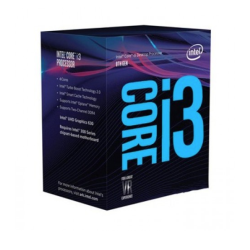
- 3.60GHz Base Clock Speed
- 4-Core 4-Thread Desktop Processor
- Intel UHD Graphics 630
- DDR4-2400 Memory Support
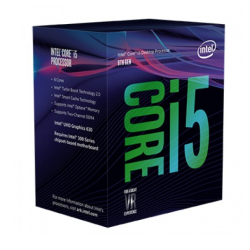
- Up to 4.10GHz Turbo Frequency
- 6-Core 6-Thread Desktop Processor
- Intel UHD Graphics 630
- DDR4-2666 Memory Support


- Clock Speed: 3.10 GHz up to 4.50 GHz
- Cores-6 & Threads-12
- 12 MB SmartCache, Socket: FCLGA1200
- Intel UHD Graphics 630

- Clock Speed:2.90 GHz up to 4.30 GHz
- Cores-6 & Threads-12
- 12 MB SmartCache
- Intel UHD Graphics 630

- Clock Speed: 2.50 GHz Up to 4.40 GHz
- CPU Cores: 6, CPU Threads: 12
- Cache: 18MB, Socket: LGA1700
- Graphics: Intel UHD Graphics 730

- Case Type - Mini Tower
- Optical Drive Bay - No
- Cooling Fan (Built-In) - 5
- Lighting Fan - ARGB

- Case Type - Mini Tower
- Optical Drive Bay - No
- Cooling Fan (Built-In) - 3
- Lighting Fan - ARGB

- Supported Motherboard Type (Max.) - Up to Micro-ATX
- Optical Drive Bay - No
- Cooling Fan (Built-In) - 3
- Lighting Fan - ARGB

- Case Type - Mid Tower
- Supported Motherboard Type (Max.) - Up to ATX
- Optical Drive Bay - No
- Cooling Fan (Built-In) - 1

- Case Type: Mini Tower
- Motherboard Support: Micro ATX/ITX
- Pre installed Fans: 5 x ARGB Fan
- Ports: USB 3.0 x 1, USB 2.0 x 1, Audio Port x 1

- Speed: 3.7GHz up to 4.2GHz
- Memory Speed: Up to 2933MHz
- Cache: L2: 2MB, L3: 4MB
- Cores-4 & Threads-8
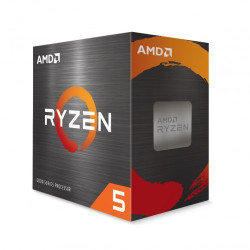
- Clock Speed: 3.6GHz; Up to 4.6GHz
- 6 Cores & 12 Threads
- L2 Cache: 3MB; L3 Cache: 16MB
- CPU Socket: AM4

- Speed: 3.9GHz up to 4.4GHz
- Cache: L2: 3MB, L3: 16MB
- Cores-6 & Threads-12
- CPU Socket: AM4
- Speed: 3.9GHz up to 4.4GHz
- Cache: L2: 3MB, L3: 16MB
- Cores-6 & Threads-12
- Memory Speed: Up to 3200MHz